
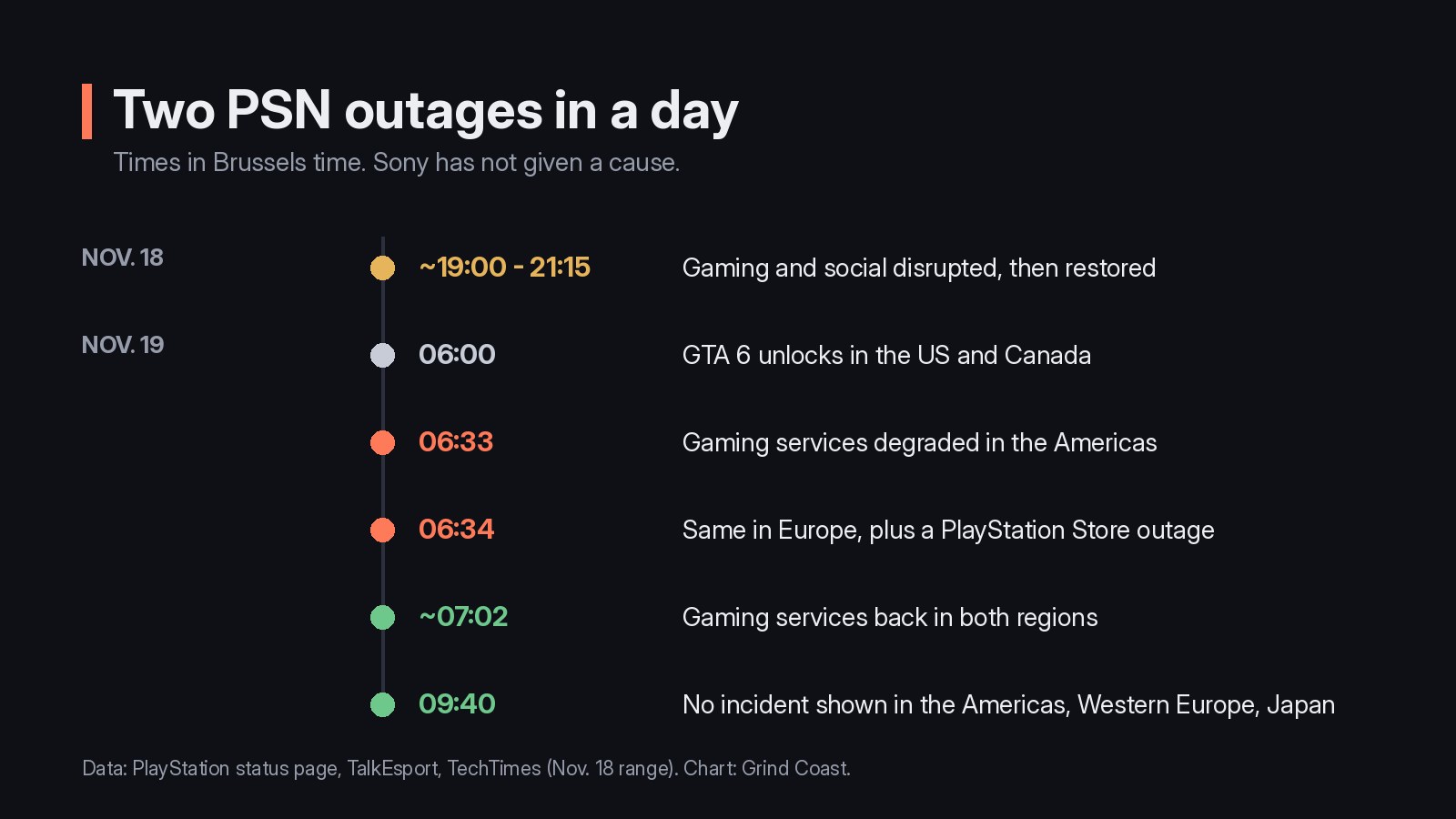
PlayStation Network failed twice in the hours around GTA 6’s launch. On Wednesday, November 18, The Guardian reported widespread sign-in and connection problems, acknowledged on PlayStation’s status page with a warning that players "might have difficulty launching games, apps, or network features". Then, on November 19, the same notice returned 33 minutes after the game unlocked in the United States, according to TalkEsport. At 09:40 (Brussels time), PlayStation’s status page showed no incident in the Americas, Western Europe or Japan.
Two outages in less than a day
The first disruption began in the early afternoon in New York, in the evening in Europe. The Guardian counted 1,228 Downdetector reports, and TechTimes, compiling several outlets, puts the return to normal between 2:30 and 3:15 p.m. Eastern time, between 20:30 and 21:15 in Brussels. Sony has not given a cause.
The second hit at launch. GTA 6 unlocked in the US and Canada at 06:00 Brussels time, and at 06:33 the status page marked gaming services as degraded on PS5 and PS4 across the Americas, then in Europe, the Middle East and Oceania a minute later, along with a PlayStation Store outage, TalkEsport reports. Digit noted more than 8,900 Downdetector reports at the peak, and players explaining on social media that their console could not verify the game’s license. By 07:02, gaming services were back in both regions.
If GTA 6 still won’t start
With the network back, a game that stays locked usually comes down to its license on the console. The steps below come from PlayStation’s own support pages, including the one for error CE-109245-1, "the license information of the content can’t be confirmed". Before trying a second purchase, check your order history: PlayStation’s GTA VI page shows where.
Our read
Avoid deleting and reinstalling the game: PlayStation lists it as a last resort, and at about 212 GB the download would cost hours. Console Sharing and Offline Play is the real safeguard if PSN fails again, but it can only be switched on while the network works, which is why it is worth checking now. For the rest of your first evening, see our launch checklist and our article on the required PS5 update.
What we don’t know
Neither Sony nor Rockstar has explained the two outages or linked them to GTA 6. Reports also differ on whether a downloaded digital game checks its license at every launch, as TechTimes notes, so offline play is a safeguard, not a guarantee.
Step by step
Step 1
Check PlayStation’s status page
Open status.playstation.com for your country. If an alert is shown, PlayStation advises waiting until the service is back before trying again.
Step 2
Restart the console and sign in
Restart the PS5 (PS button, Power, Restart PS5), then sign in to PSN with the account that bought GTA 6 or redeemed the code from the box.
Step 3
Turn on Console Sharing and Offline Play
Go to Settings > Users and Accounts > Other > Console Sharing and Offline Play and select Enable. It is on by default on the first PS5 you signed in to, can only be active on one PS5 at a time, and needs PSN to be working.
Step 4
Restore your licenses
Go to Settings > Users and Accounts > Other > Restore Licenses, or highlight GTA 6, press the Options button and select Restore License. PlayStation says this does not affect your data.
Step 5
Update the system software
Go to Settings > System > System Software > System Software Update and Settings. GTA 6 needs the latest version to start.
Sources
- PlayStation, PlayStation Service Status
- PlayStation, Grand Theft Auto VI support
- PlayStation, How to turn on PS5 Console Sharing and Offline Play
- PlayStation, How to restore licenses on PlayStation consoles
- PlayStation, PS5 Error Code CE-109245-1
- The Guardian, PlayStation suffers widespread network problems hours before release of GTA VI
- TalkEsport, PSN Down Minutes After GTA 6 Launches in the US, PlayStation Store Goes Offline in Europe As Well
- Digit, PlayStation down again: PS5 users unable to play GTA 6, Sony confirms PSN outage
- TechTimes, PSN Sign-In Outage Preceded GTA 6 US Unlock: Install Required PS5 Update, Enable Offline Play
Checked · Published